51 of 51 products found and 0 made-up answers, across 7 vendors

Every shopper question, answered from your store. An AI shopping assistant for Shopify that checks your live catalogue and policies before it says a word.

  • 7-day free trial
  • Flat monthly price
  • No theme code

Ask it something

Real answers from our demo store, in the assistant's own words.

Larkfield AssistantAI assistant · answers from this store's info
What's the difference between the Minimal Watch and the Field Watch?
Minimal Watch — Black: Slim watch with a white dial, black case, and black fabric strap. It features a minimalist design with no numbers. Price: 129 USD Field Watch — Tan Leather: 38 mm field watch with a clean white dial, rose-gold case, and tan leather strap that softens with wear. Water-resistant up to 50 meters. Price: 145 USD

Where the answer came from

  1. Your catalogueFound both watches
  2. Your descriptions38 mm, water resistant to 50 m
  3. Your photos“Black fabric strap” — your listing only says “black strap”
  4. Live prices$129 and $145, read just now

Every detail is in the store's own copy or its product photos. Each product also gets a card with its live price and stock.

51 / 51

found the right product — even with typos, other wording, or a question in another language

8 / 8

said so when the store didn't sell it, and suggested the closest items instead

0

made-up products or prices — every link and price was the store's own

Tested in October 2026 on one store stocked with 280 products from seven vendors it had never seen: shoes, cosmetics, coffee, bedding, pet gear, olive oil and a catalogue written entirely in German. The same assistant your store gets.

What your shoppers get. Product cards with live price and stock, one tap to the cart, in their language and on any screen.

Finds the right product, even from a vague ask

By name, by description, or by how it looks: “a light blue bag”, “something warm for winter”. Each product photo is described once when your catalogue syncs, so it finds products even where your own description is empty.

  • Photo, price and stock on every card
  • Prices read at the moment of asking
  • Sold-out items say so
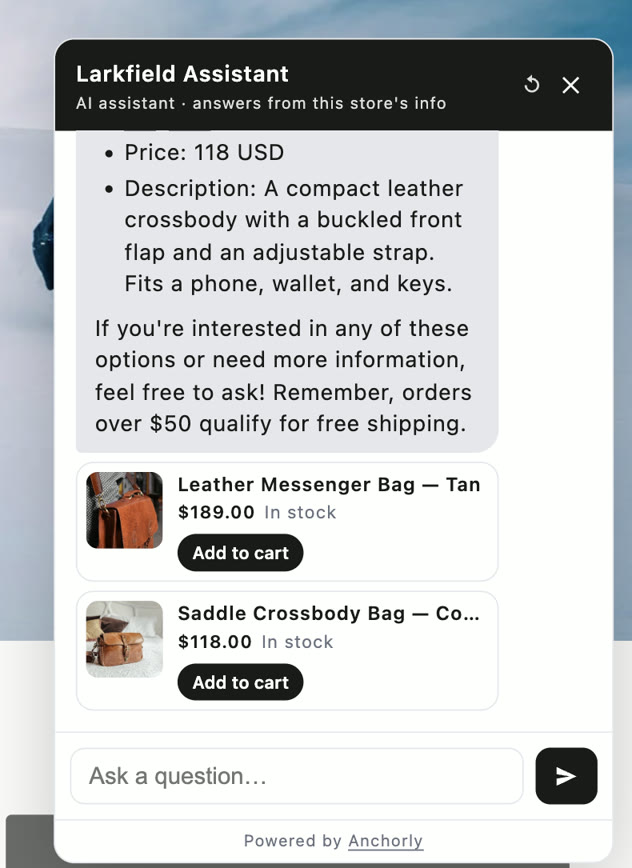
The Larkfield Assistant answering “Do you have a leather bag for work?” with two product cards, each with a photo, price, stock and an Add to cart button.

One tap to the cart

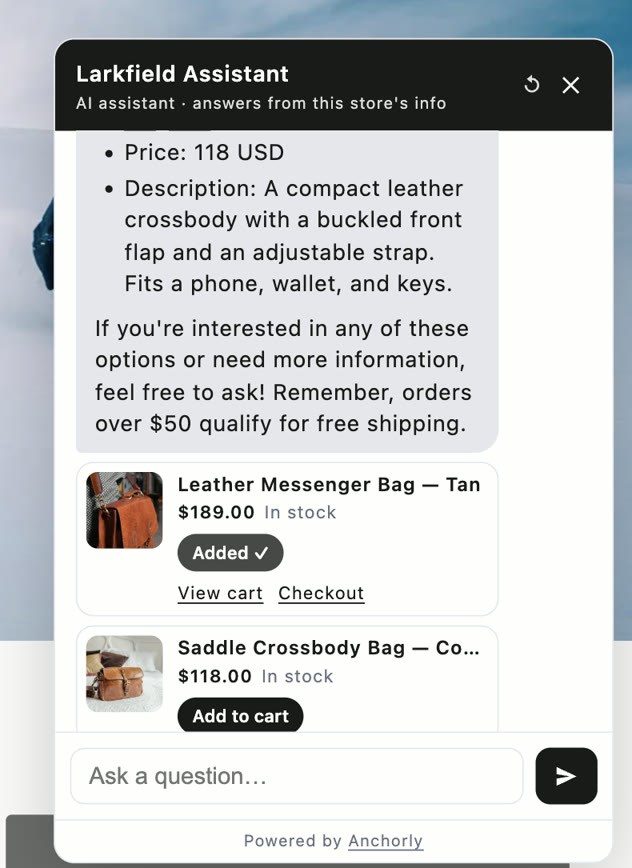
In-stock items with a single option add straight to your store's own cart, then offer View cart or Checkout. Items with sizes open the product page.

The same answer after tapping Add to cart: the button reads Added, with View cart and Checkout links under it.

Replies in the shopper's language

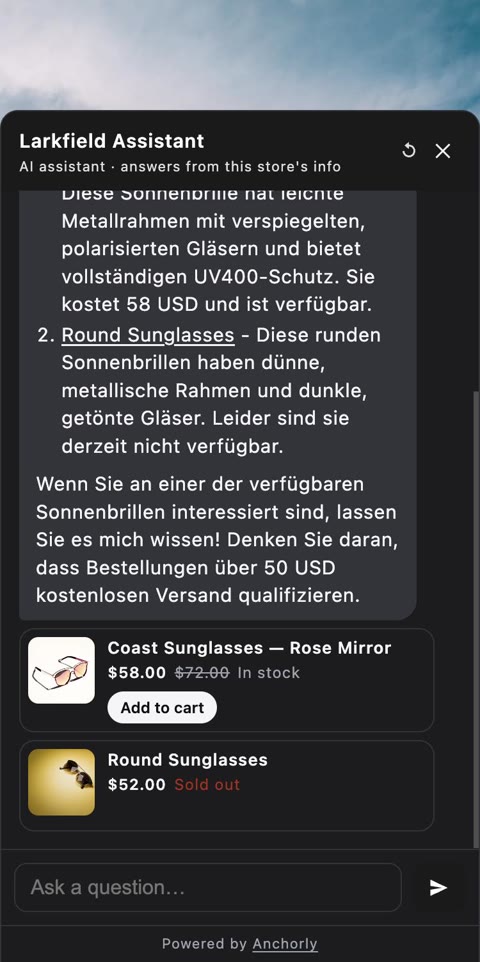
Asked in German on a store written in English, it answered in German. On a phone it opens as a sheet sized to the screen.

The assistant on a phone as a bottom sheet in dark mode, answering “Habt ihr Sonnenbrillen?” in German with a sale price and a sold-out card.

Reads your store, not the internet

Products, photos, pages and policies sync when you install and stay current as you edit them.

Products synced
17
Photos described
17
Policies found
Privacy
Refund policy
Not published

Our demo store has no refund policy, so the assistant tells shoppers that. It never writes one.

Takes a message when it can't answer

A question your store doesn't cover becomes a lead, not a guess.

  1. A shopper askssomething your pages and policies don't say
  2. It says soand offers to pass the question on
  3. You get the questionwith the email they chose to leave

Watch it on a real store

Under three minutes on our demo store, recorded as it happened.

  1. 1 Finds a product by how it looks
  2. 2 Reads price and stock as it's asked
  3. 3 Adds to the cart in one tap
  4. 4 Says which size is sold out
  5. 5 Says when the store doesn't sell it
  6. 6 Won't invent a refund policy

Why it doesn't make things up. Three rules built into how it works, not instructions it was asked to follow.

Facts are looked up, never remembered

Prices, stock and policies are read from your store at the moment a shopper asks. It can't misremember a price it was never asked to remember.

No match, no answer

When nothing in your store is close enough to the question, the assistant is handed nothing, so it can't build an answer from a weak match. It says it doesn't know.

Every answer leaves a trail

Each conversation is in your Shopify admin with the lookups behind every reply. When a shopper gets an answer you didn't expect, you can open it and see why.

And you can see everything it did. Anchorly opens inside your Shopify admin, signed in as you. There is no separate login.

The questions your store couldn't answer, counted

A list of what to add to your product pages and policies, most asked first.

QuestionWhyAsked
Do you ship to Canada?Not covered by your store's content6×
Can I change my delivery address?Asked for a person3×
Is the tote real leather?Not covered by your store's content2×

Audits that grade its answers

Questions written from your own catalogue, answered and marked.

Answers correct 12 of 15

Right information found 10 of 15

A real audit of our demo store, misses included.

Switch off what it shouldn't discuss

A switched-off topic is removed from what it can do, not just discouraged.

  • Products and prices
  • Stock availability
  • Search by appearance
  • Shipping, returns and refunds
  • Suggest related products

Every conversation, with the work behind it

Read any transcript, and see which lookups each reply ran.

First questionLookupsOutcome
Do you have a leather bag for work?Catalogue, stockAnswered
Habt ihr Sonnenbrillen?Catalogue, stockAnswered
Do you ship to Canada?Policies, pagesLeft an email
Can you give me a 50% discount code?NoneDeclined

Screens drawn with sample data, apart from the audit, which is real.

Live in minutes, with nothing to train. No prompt box to babysit and no documents to upload.

1

Install it from Shopify

Your products, photos, pages and policies sync on their own. There is no account to create and no key to paste.

2

Answer a few questions

Its name, its tone, what to promote and what it should never discuss. A few more are written from your own catalogue.

3

Switch it on in the theme editor

One click, with no code added to your theme. Uninstalling removes it completely.

Flat monthly pricing. Most AI support tools charge per resolved conversation, so the better the assistant gets, the more you pay. These plans don't.

Basic

$29/mo

  • 1,000 messages a month
  • Up to 500 products
  • Usage reporting

A small catalogue and steady traffic.

ProRecommended

$50/mo

  • 4,000 messages a month
  • Up to 2,000 products
  • Answer quality audits

For a store taking real support volume.

Scale

$99/mo

  • 15,000 messages a month
  • Up to 10,000 products
  • Answer quality audits

High traffic and a catalogue to match.

Unlimited

$499/mo

  • No message cap
  • Up to 50,000 products
  • Answer quality audits

No message ceiling; the daily cost breaker still applies.

Every store can try it free for 7 days, with 100 shopper messages and up to 100 products. Billed through Shopify. Over your limit the assistant keeps taking messages, so you never lose a lead to a cap.

Questions, answered plainly.

What is Anchorly?

An AI shopping assistant and AI chatbot for Shopify stores. It sits on your storefront and answers shoppers' questions about products, prices, sizes, stock, shipping and returns, 24/7 — reading your live catalogue and published policies each time, so its answers are your store's own information.

How is it different from other Shopify AI chatbots?

It never states a price, stock level or policy from memory: every fact comes from a live lookup in your store at the moment a shopper asks. When your store doesn't cover a question it says so and takes the shopper's email, instead of writing something plausible. And it costs a flat monthly price, not a fee per resolved conversation.

Can it recommend products?

Yes. Shoppers can ask by name, by description, or by how something looks — "a light blue bag", "boots for hiking in the rain". Each product photo is described once when your catalogue syncs, so it can find products even where your own description is empty. Recommendations come with product cards showing the photo, price and stock.

Can shoppers add to cart from the chat?

Yes. A product with a single option that is in stock has an Add to cart button on its card, which adds it through your store's own cart, then offers View cart and Checkout. Products with sizes open the product page so the shopper picks the right one. The assistant itself never adds anything without the shopper's tap.

Does it answer in other languages?

It replies in the language the shopper writes in, and its own buttons follow your storefront's language (English, German, French, Spanish, Italian, Dutch and Portuguese).

Can it answer "where is my order?"

The order lookup is built: status, tracking and items, shown only after the order number and the email or phone on it match. It switches on once Shopify approves Anchorly's access to order data. Until then, order questions are pointed to your store's order status page and the shopper can leave their email.

What happens when it can't answer?

It says so, offers to pass the question to you, and collects the shopper's email as a lead. Unanswered questions are grouped and counted in your dashboard — a list of what to add to your product pages or policies.

Does it slow down my Shopify store?

It's added as a theme app extension — no code in your theme — and its script is about 15 KB, loaded after your page. Uninstalling removes it completely.

Do I need to train it?

No. Your products, pages and policies sync automatically after install, and you answer a few setup questions about tone and what it should avoid. Setup takes a few minutes.

Does it work outside Shopify?

Not yet. Anchorly runs on Shopify today. Support for other sites is in progress and isn't something you can use yet.

How much does it cost?

Plans start at $29 a month, billed through Shopify, with a 7-day free trial of up to 100 shopper messages. Prices are flat: you pay the same whether it answers one question or a thousand within your plan.
Put it on your store.

Anchorly is on its way to the Shopify App Store. Until it's listed, tell us about your store and we'll set it up with you.

Reply time
Usually within a day.
A good first message
What you sell, roughly how many products, and the question your shoppers keep asking.

Talk to us about your store

or email [email protected]